
还记得我在 Visual Studio 上写的第一个程序:
#include <stdio.h>

int main(int argc, char** argv) {
  printf("Hello World!\n");
  return 0;
}当第一次看到命令行按照以上代码打印出 “Hello World!” 时,我有一种非常奇妙的感觉,因为我发现我好像正在与一台计算机进行交流切磋。而我占据上风,已经吃透了 printf 这个函数,已经吃透了这个程序。可是当我发现项目大小竟然超过 5MB,而程序的二进制大小居然有足足 60KB 时,我被迷惑住了:这么简单的程序怎么这么大?事情似乎没那么简单,这背后有一些我没看见的东西,Visual Studio 是不是在背后偷偷做了什么?能不能写出一个最小的 Hello World 程序?
程序的生成
Visual Studio 的集成度比较高,一度让我以为程序是直接通过代码一键生成的。后来渐渐知道,要想从一段代码得到可执行文件,还需要经过编译、链接之类的步骤
为了能够更清楚地学习整个过程,我在 Linux 环境下对 Hello World 程序进行编译。实际上在编译过程中还有很多其他要考虑的东西,在这里通过一个简单的程序,对程序的编译过程有一个感性的认识就算达成目标了
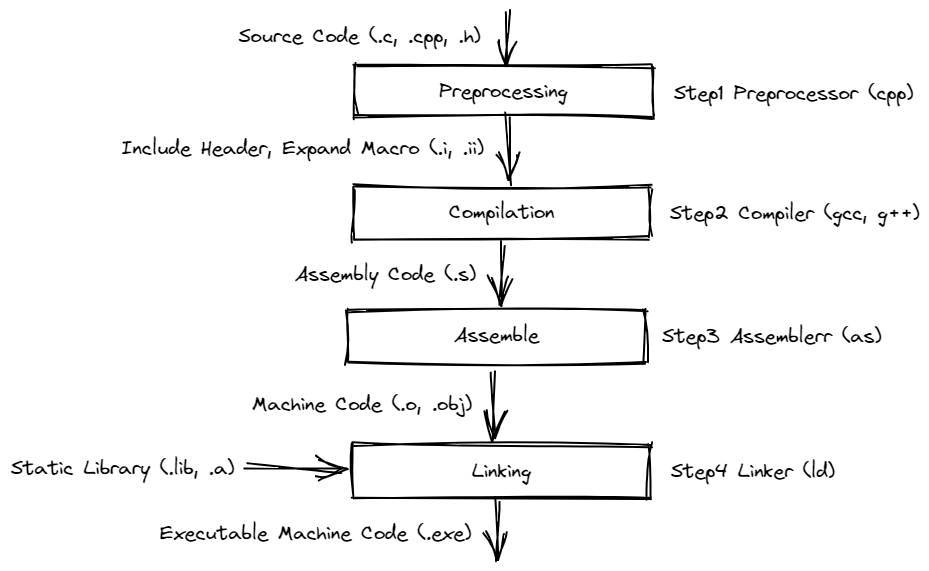
Preprocessing
在预处理阶段中会将代码中的头文件以及宏全部展开,便于后面进行编译。使用如下命令进行预处理:
cpp hello_world.c -o hello_world.i之后会生成一个文本文件,从中摘取一段内容:
# 1 "hello_world.c"
# 1 "<built-in>"
# 1 "<command-line>"
...
# 462 "/usr/include/features.h" 2 3 4
# 485 "/usr/include/features.h" 3 4
# 1 "/usr/include/x86_64-linux-gnu/gnu/stubs.h" 1 3 4
...
typedef unsigned char __u_char;
typedef unsigned short int __u_short;
typedef unsigned int __u_int;
typedef unsigned long int __u_long;
...
struct _IO_FILE;
...
extern FILE *stdin;
extern FILE *stdout;
extern FILE *stderr;
...
extern int fprintf (FILE *__restrict __stream,
      const char *__restrict __format, ...);
extern int printf (const char *__restrict __format, ...);
extern int putchar (int __c);
...
# 3 "hello_world.c"
int main(int argc, const char* argv[]) {
  printf("Hello World!\n");
  return 0;
}整个文件有 700 多行,只有最后的 4 行是我写的内容。可以看到,经过预处理过程后,得到的预编译文件中定义了诸如 int,unsigned 等常见类型名,定义了 stdin,stdout 等标准输入输出,以及使用 extern 关键字给出了所有必要的函数。将所有这些都准备好,就方便了 Compilation 时对关键字,函数名的处理。
Compilation
经过预处理,代码中所有的符号和变量名都可以被识别和进一步处理。在 Compilation 过程中,前面的 .i 文件处理为汇编代码,越来越底层,离机器码仅剩一步之遥:
        .file   "hello_world.c"
        .text
        .section        .rodata
.LC0:
        .string "Hello World!"
        .text
        .globl  main
        .type   main, @function
main:
.LFB0:
        .cfi_startproc
        endbr64
        pushq   %rbp
        .cfi_def_cfa_offset 16
        .cfi_offset 6, -16
        movq    %rsp, %rbp
        .cfi_def_cfa_register 6
        subq    $16, %rsp
        movl    %edi, -4(%rbp)
        movq    %rsi, -16(%rbp)
        leaq    .LC0(%rip), %rdi
        call    puts@PLT
        movl    $0, %eax
        leave
        .cfi_def_cfa 7, 8
        ret
        .cfi_endproc
.LFE0:
        .size   main, .-main
        .ident  "GCC: (Ubuntu 9.4.0-1ubuntu1~20.04.1) 9.4.0"
        .section        .note.GNU-stack,"",@progbits
        .section        .note.gnu.property,"a"
        .align 8
        .long    1f - 0f
        .long    4f - 1f
        .long    5
0:
        .string  "GNU"
1:
        .align 8
        .long    0xc0000002
        .long    3f - 2f
2:
        .long    0x3
3:
        .align 8
4:在这段汇编代码中,定义了基本的代码段,数据段和栈区。因为程序只是简单的打印 “Hello World!",所以上面的代码只是将字符串的地址和长度送到相应的寄存器,然后通过 call 执行 puts 函数,在 put 函数中会执行 write 这个系统调用向终端对应的文件写入数据。从这里也可以看出,实际上 printf 是将系统调用进行了封装,如果这里没出现格式化字符串,这里会直接将其变为 puts。这里
有一篇博客讲了一些关于 printf 代码层面的东西可以看看。
Assemble
通过 Compilation 阶段得到的汇编直接就可以变为二进制的机器指令,使用 as 命令就可以做到这一点
$ ll hello_world.o
-rw-r--r-- 1 uername uername 1688 Nov 12 10:56 hello_world.o现在得到的二进制码只有 1688,而最终生成的程序大小为 16504,整个文件的大小足足扩大了十倍。那些增多的内容都是在 Linking 过程中添加的。
Linking
Linking 过程之所以存在,是因为这个过程可以将其他已经实现好的子模块与程序进行拼装,减少单个文件体积,模块化的设计也可以减少开发量就比如将字符串打印到命令行的这个过程实际上是操作系统给我们实现好的,如果自己手动 DIY,从系统中断开始写起简直就是噩梦。在 Assemble 阶段已经将函数入口之类的内容定义好了,在 Linking 时主要处理的就是库与库之间的地址跳转,保证每个函数都能跳到其机器代码实现的部分
链接的指令使用 gcc 就可以了
$ gcc hello_world.o -o hello_world
$ ll hello_world
-rwxr-xr-x 1 username username 16504 Nov 12 12:17 hello_world向更小的 Hello World 进发
前面生成的可执行文件大小为 16504,虽然小,但是有点大。能不能把它变的小一点呢?
编译优化
我最先想到的是加 -O 优化,但是程序中没有值得优化的地方,添加优化参数后对最终的文件没有任何影响:
-rwxr-xr-x  1 username username  16504 Nov 12 13:52 hello_world_o0
-rwxr-xr-x  1 username username  16504 Nov 12 13:52 hello_world_o1
-rwxr-xr-x 1 username username 16504 Nov 12 13:53 hello_world_o2剔除符号表
在程序进行 Linking 时,会根据符号表进行链接,在链接为可执行程序之后,这个符号表一般就用不到了,但还会保存在可执行程序中。我们可以使用 nm 来查看一个可执行程序的符号表:
0000000000003dc8 d _DYNAMIC
0000000000003fb8 d _GLOBAL_OFFSET_TABLE_
0000000000002000 R _IO_stdin_used
                 w _ITM_deregisterTMCloneTable
                 w _ITM_registerTMCloneTable
000000000000215c r __FRAME_END__
...
00000000000011e8 T _fini
0000000000001000 t _init
0000000000001060 T _start
0000000000004010 b completed.8061
0000000000004000 W data_start
0000000000001090 t deregister_tm_clones
0000000000001140 t frame_dummy
0000000000001149 T main
                 U puts@@GLIBC_2.2.5
00000000000010c0 t register_tm_clones我们通过加 -s 参数可以在生成可执行程序时将这个符号表去掉:
$ gcc -s hello_world.c -o hello_world
$ ll hello_world
-rwxr-xr-x 1 username username 15K Nov 12 14:05 hello_world可以看到少了 2K,不能说非常有用吧,好像也没什么大的效果
使用内联汇编
从前面 Compilation 阶段生成的汇编中可以看到,虽然我们在程序中使用的是 printf 函数,实际在执行中已经被替换为 puts,如果要使用 printf,那么必须要添加 stdio.h 这个头文件,虽然这个头文件贴心的为我们封装了一些函数进行系统调用,但是现在却显得有一点累赘。那我们能否可以直接通过系统调用来进行打印?是可以的,想要在 C 程序中直接使用 write 系统调用,需要访问寄存器,所以我们要使用内联汇编
:
char* str = "Hello World!\n";

int main() {
  asm("movq $1, %%rax \n"
      "movq $1, %%rdi \n"
      "movq %0, %%rsi \n"
      "movq $13, %%rdx \n"
      "syscall \n"
      :
      : "r"(str)
      : "rax", "rdi", "rsi", "rdx");
  return 0;
}使用内联汇编后,文件确实又减小了
$ gcc -s hello_world.c -o hello_world
$ ls -la hello_world
-rwxr-xr-x 1 username username 14336 Nov 12 14:22 hello_world可是如果在 gcc 命令中添加 -nostdlib,会报如下错误:
$ gcc -s -nostdlib hello_world.c -o hello_world
/usr/bin/ld: warning: cannot find entry symbol _start; defaulting to 0000000000001000这个 _start 又是何方神圣?原来,这是由标准库 crt1.o 提供的一个程序入口。既然我们不使用标准库,那么程序的入口函数还需要我们设置,通过 -e 参数来指定程序的入口函数名称:
$ gcc -s -nostdlib -e main -nostartfiles hello_world.c -o hello_world
$ ls -la hello_world
-rwxr-xr-x 1 username username 13520 Nov 12 14:30 hello_world可以看到程序越来越小。相对于之前的 16504 来说已经很不错了,但是整个字符串 “Hello World!” 也只有 12 个字节,多出来的 13K 用到哪里去了?
自定义 Linker 脚本
如果我们使用 readelf 查看得到的文件信息:
$ readelf -S -W hello_world
There are 16 section headers, starting at offset 0x30d0:

Section Headers:
  [Nr] Name              Type            Address          Off    Size   ES Flg Lk Inf Al
  [ 0]                   NULL            0000000000000000 000000 000000 00      0   0  0
  [ 1] .interp           PROGBITS        0000000000000318 000318 00001c 00   A  0   0  1
  [ 2] .note.gnu.property NOTE            0000000000000338 000338 000020 00   A  0   0  8
  [ 3] .note.gnu.build-id NOTE            0000000000000358 000358 000024 00   A  0   0  4
  [ 4] .gnu.hash         GNU_HASH        0000000000000380 000380 00001c 00   A  5   0  8
  [ 5] .dynsym           DYNSYM          00000000000003a0 0003a0 000018 18   A  6   1  8
  [ 6] .dynstr           STRTAB          00000000000003b8 0003b8 000001 00   A  0   0  1
  [ 7] .rela.dyn         RELA            00000000000003c0 0003c0 000018 18   A  5   0  8
  [ 8] .text             PROGBITS        0000000000001000 001000 00003c 00  AX  0   0  1
  [ 9] .rodata           PROGBITS        0000000000002000 002000 00000e 00   A  0   0  1
  [10] .eh_frame_hdr     PROGBITS        0000000000002010 002010 000014 00   A  0   0  4
  [11] .eh_frame         PROGBITS        0000000000002028 002028 000038 00   A  0   0  8
  [12] .dynamic          DYNAMIC         0000000000003ef0 002ef0 000110 10  WA  6   0  8
  [13] .data             PROGBITS        0000000000004000 003000 000008 00  WA  0   0  8
  [14] .comment          PROGBITS        0000000000000000 003008 00002b 01  MS  0   0  1
[15] .shstrtab STRTAB 0000000000000000 003033 00009b 00 0 0 1可以发现程序分了 15 个段,每个段都只用了一点点,Off 比 Size 大的多,这个情况造成了非常多的空间浪费。那我们怎样将 Off 改小一点呢?可以通过设置 ld 的链接脚本修改每个段,默认的 Linking 脚本可以通过 ld --verbose 进行查看,这里不在展示,我只将必须的 .text .data .rodata 等段进行链接。
ENTRY(main)
SECTIONS
{
  . = 0x8048000 + SIZEOF_HEADERS;
  tiny : { *(.text) *(.data*) *(.rodata*) *(.note.gnu.build-id) }
  /DISCARD/ : { *(*) }
}上面的 0x8048000 是程序虚拟地址的起始位置。.note.gnu.build-id 段则是因为我的 gcc 版本要求添加这个段我才设置的。使用 -T 来使用这个 Linking 脚本:
$ gcc hello_world.c -s -e main -nostartfiles -nostdlib -T link.lds -o hello_world
$ ./hello_world
Hello World!
$ ls -la hello_world
-rwxr-xr-x 1 username username 568 Nov 12 15:05 hello_world可以看到,通过设置 Linking 时的段的属性,可以显著减少可执行程序的大小,从之前的 13520 骤降到 568。
汇编
既然想要程序更小,不如返璞归真,直接拿汇编来写。使用汇编可以精确地控制每个块的内容:
section .data
message: db "Hello World!", 0xa

section .text

global main
main:
  mov rax, 1
  mov rdi, 1
  mov rsi, message
  mov rdx, 13
  syscall
  mov rax, 60
  xor rdi, rdi
syscall上面的代码只保留了只有一个代码段和一个数据段,main 中将字符串地址放到寄存器 rsi 中,将字符串长度放到寄存器 rdx 后,通过 syscall 启用系统调用,调用号为寄存器 rax 中的值 1,最后通过第 60 号系统调用退出程序,汇编代码使用 nasm 进行汇编,并配合上面的 Linking 脚本进行链接:
$ nasm -f elf64 hello_world.s
$ gcc -T link.lds -s -e main -nostartfiles hello_world.o -o hello_world
$ ./hello_world
Hello World!
$ ls -la hello_world
-rwxr-xr-x 1 username username 480 Nov 12 15:32 hello_world现在的程序只有 480 个字节大小,我们的目标基本上已经完成了。
手写 ELF 文件
Linux 下的可执行文件是 ELF 格式的,汇编代码转换为可执行的 ELF 文件时还要添加一些额外的内容,如果可以直接控制这个文件的每一位,那么文件的大小就可以由我们精确控制了:
BITS 64

; ELF header
ehdr:
          db    0x7F, "ELF"         ; magic
          db    2                   ; 64-bit
          db    1                   ; little endian
          db    1                   ; ELF version, always 1
          db    0x03                ; target Linux
  times 8 db    0                   ; padding
          dw    0x02                ; executable
          dw    0x3E                ; x86-64 machine
          dd    0x01                ; ELF version, always 1
          dq    _start              ; execution entry (in memory)
          dq    phdr-ehdr           ; program header (in file)
          dq    0                   ; section header table
          dd    0                   ; flags
          dw    ehdrsize            ; size of this ELF header
          dw    phdrsize            ; size of the program header table entry
          dw    1                   ; number of program headers
          dw    0                   ; size of the section header table entry
          dw    0                   ; number of sections headers
          dw    0                   ; name section index: no names section

ehdrsize  equ   $ - ehdr

; Program header
phdr:
          dd    0x01                ; loadable segment
          dd    5                   ; read+execute segment
          dq    codestart           ; segment content offset (in file)
          dq    _start              ; virtual address in memory
          dq    _start              ; physical address in memory
          dq    codesegsize         ; size in the file
          dq    codesegsize         ; size in memory
          dq    0x1000              ; alignment

phdrsize  equ   $ - phdr
codestart equ   $ - ehdr


; Code segment
_start:
          org 0x400000
          ; the file start is at memory location 0x400000
          ; the code loads at 0x400078. this is necessary to ensure 0x1000
          ; alignment. (on my machine, lower alignments give segfaults)

          mov rax, 1
          mov rdi, 1
          mov rsi, msg
          mov rdx, msglen
          syscall
          mov rax, 60
          mov rdi, 0
          syscall

; data
msg:         db    "Hello World!",10
msglen       equ   $ - msg

codesegsize equ $ - _start如下为编译过程:
$ nasm -fbin hello_world.asm -o hello_world
$ ./hello_world
Hello World!
$ ls -la hello_world
-rwxr-xr-x 1 username username 172 Nov 12 15:45 hello_world最终得到的 Hello World 程序有 172 个字节大小。通过 xxd 可以看到程序内的每个字节信息:
$ xxd hello_world
00000000: 7f45 4c46 0201 0103 0000 0000 0000 0000  .ELF............
00000010: 0200 3e00 0100 0000 7800 4000 0000 0000  ..>.....x.@.....
00000020: 4000 0000 0000 0000 0000 0000 0000 0000  @...............
00000030: 0000 0000 4000 3800 0100 0000 0000 0000  ....@.8.........
00000040: 0100 0000 0500 0000 7800 0000 0000 0000  ........x.......
00000050: 7800 4000 0000 0000 7800 4000 0000 0000  x.@.....x.@.....
00000060: 3400 0000 0000 0000 3400 0000 0000 0000  4.......4.......
00000070: 0010 0000 0000 0000 b801 0000 00bf 0100  ................
00000080: 0000 48be 9f00 4000 0000 0000 ba0d 0000  ..H...@.........
00000090: 000f 05b8 3c00 0000 bf00 0000 000f 0548  ....<..........H
000000a0: 656c 6c6f 2057 6f72 6c64 210a ello World!.区区 172 字节,好像也不是不能背😂